
How do I activate payments on my HyperRing?Updated 6 months ago
How to add a Payment Card to a HyperRing and Activate it
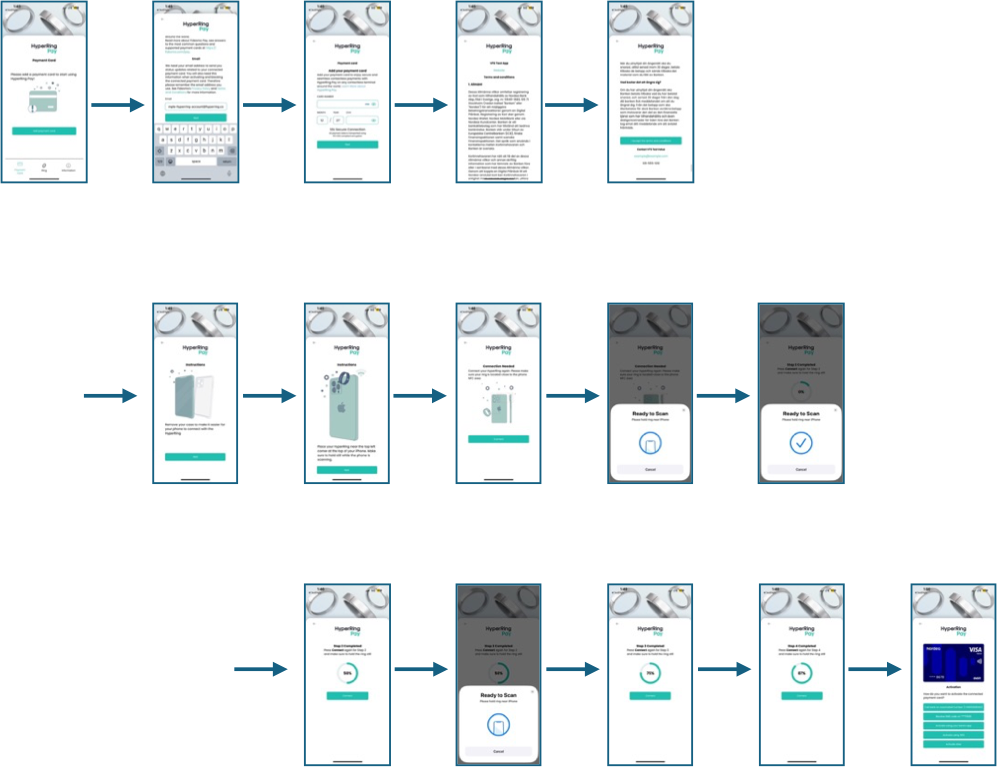
- Navigate to the Rings List.
- Select a ring and tap "Connected Payment Card".
- Tap "Add Payment Card".
- Enter your email address for updates.
- Input your card details:
- Card Number
- Expiration Date
- CVV
- Accept the Terms & Conditions.
- Remove any phone case for optimal scanning.
- Scan your HyperRing multiple times until the process is complete.
- Activate the card using one of the following:
- Call the bank’s automated number
- Receive an SMS code
- Use the bank’s mobile app
- Verify your card through your bank’s secure online verification.
Note: Each ring can have its own payment card, and cards are managed separately.